Your Stripe dashboard and payouts
See your online payments and payouts in Stripe, and change the bank account your money goes to.
Updated Nov 18, 2026
When you connect Stripe, Stripe sets up an account in your business's name. Your client's online payments go to that account, and Stripe sends the money to your bank. Track and Invoice never holds your money. The Stripe dashboard is a simple, secure Stripe page for that account.
- Go to Settings, then Payments.
- Under Your Stripe dashboard, click Open Stripe dashboard.
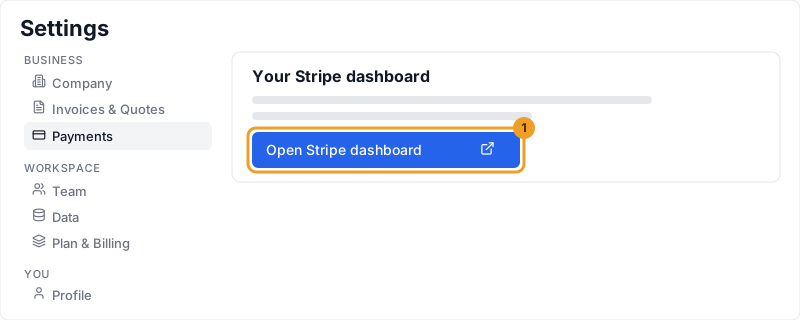
- The button takes you straight to your Stripe dashboard in a new tab. It opens dashboard.stripe.com. Sign in with the email you used for that account. If Stripe shows that email under Your Stripe dashboard, use that one. Stripe may ask you to confirm with a code it sends you. Only an Admin can do this.
In the Stripe dashboard you can see card and bank transfer payments from clients, your balance, each payout to your bank and when it will arrive, and tax forms if Stripe issues one to you. You can also manage refunds, disputes, receipts, and the name on your client's statement. You never need the Developers section or API keys. See how online payments work.
A refund you make in Stripe shows on the invoice after it succeeds. An Admin can also refund that payment from the invoice. See how a refund is recorded. You can change the bank account your money is sent to, and your business and contact details. Fees, and whether clients can pay by card or bank transfer, are set in Track and Invoice, not in Stripe.
Your client pays. Card payments usually become available after about 2 business days. Bank transfer payments take longer to clear, often 4 to 5 business days. The invoice shows Processing until then. Stripe then pays out to your bank automatically, and a bank can take a business day to post it. Your very first payout can take longer while Stripe finishes checking a new account. The exact dates are always shown in the Stripe dashboard.
When your client pays the fee, you usually receive the invoice amount. On a card payment under about $60, Stripe's own fee can be more than 3.5%, and that difference comes out of your payout. If your business pays the fee, you receive the invoice amount minus the card fee (3.5%) or the bank fee (1.25%). See how online payments work. Learn more about card and bank fees.
Common questions
That happens when your business pays the fee. You receive the invoice amount minus the card fee (3.5%) or the bank fee (1.25%). When your client pays the card fee, a card payment under about $60 can also pay you less, because Stripe's own fee is more than 3.5%. See how online payments work.
No. A new connection is a Standard account, and you sign in to it at dashboard.stripe.com. An older Express connection opens through Open Stripe dashboard under Settings, then Payments.
Yes. Open Stripe dashboard takes you to dashboard.stripe.com. Sign in with the email you used for that Stripe account. If Stripe shows that email under Your Stripe dashboard, use that one.
In Track and Invoice, on that invoice's payment history. See how a payment is recorded.
Did this help?